Predictive Grain Analytics
To view predictions on your safe storage time, quality metrics, or to run conditioning scenarios with or without aeration, navigate to the Predictions tab. You can find this tab by going to the Asset section of the platform and selecting the desired asset.
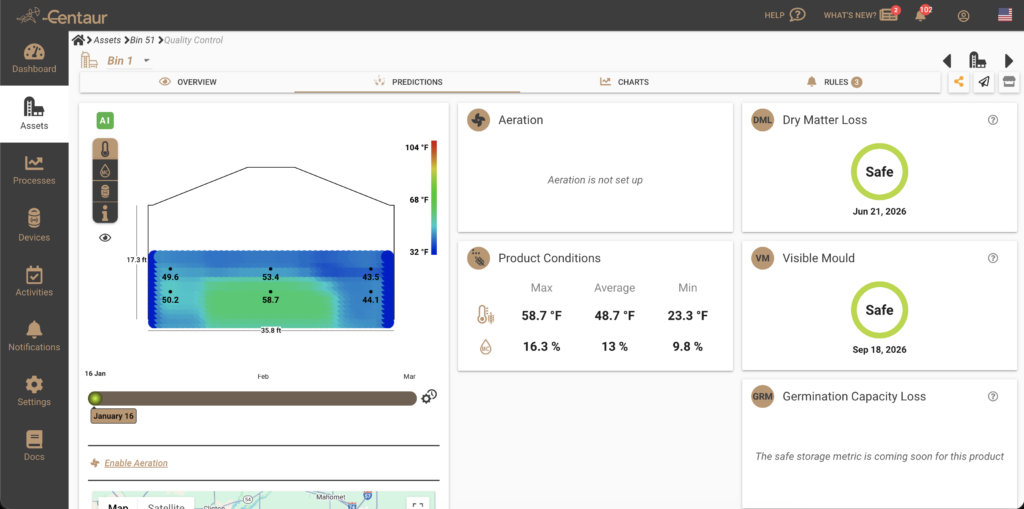
How Centaur’s Predictive Analytics Work
Centaur’s predictive analytics forecast the future condition of your stored commodity based on several key factors:
- Initial Product Condition: The state of the commodity at the time of loading
- Sensor-Generated Metrics: Quality metrics generated by our quality sensors
- Current and Future Weather: The weather in your area, including upcoming months based on historical data
- Conditioning Activities: Any conditioning you’ve done, such as aeration, cooling, or drying
Key Quality Metrics Provided
The system provides insights into various quality metrics:
- Dry Matter Loss (DML): An estimate of how much dry matter your commodity may lose over time.
This calculated Safe Storage Time is based on the Dry Matter Loss. Dry Matter Loss is the result of respiration. Respiration is the process of oxidizing (combusting) carbohydrates and yielding carbon dioxide, water vapour and energy. With a threshold of 1% of dry matter lost. - Visible Development (VM): An estimate of when visible mold may start to appear
This calculated Safe Storage Time is based on Visible Mould. Visible Mould is the appearance of microorganisms which results to the spoilage of grains - Germination Capacity Loss (GRM) : This calculated Safe Storage Time is based on the Germination Capacity. Germination Capacity is defined as the appearance of the first signs of outgrowth, i.e. the visible protrusion of the radical. Quality losses are associated with a reduction in germination capacity
Please note: These metrics are product-dependent and may not be available for all stored commodities. For more information, please contact our support team at support@centaur.ag.
Running a Prediction or Simulation
You can either view the default predictions (where the system assumes no aeration during the simulated period) or run a “what if” scenario by including specific aeration periods. This helps you assess whether you can effectively prolong the safe storage time of your commodity or improve its condition to prevent spoilage or deterioration.
Adding Aeration to Your Scenario
To include aeration in your predictive simulation:
- Enable Aeration: Click on Enable Aeration
- Configure Aeration Settings: In the pop-up window, set the starting date for aeration, the interval (how often aeration should occur), and the duration of each aeration session (in hours)
- Calculate Predictions: Press Calculate to run the predictive analytics, incorporating the effects of aeration and cooling
- Save the Scenario: Press Save to store your new scenario
- Run Analysis: Click Run Analysis to execute the simulation and generate predictions on the quality of your stored commodity, including the impact of aeration
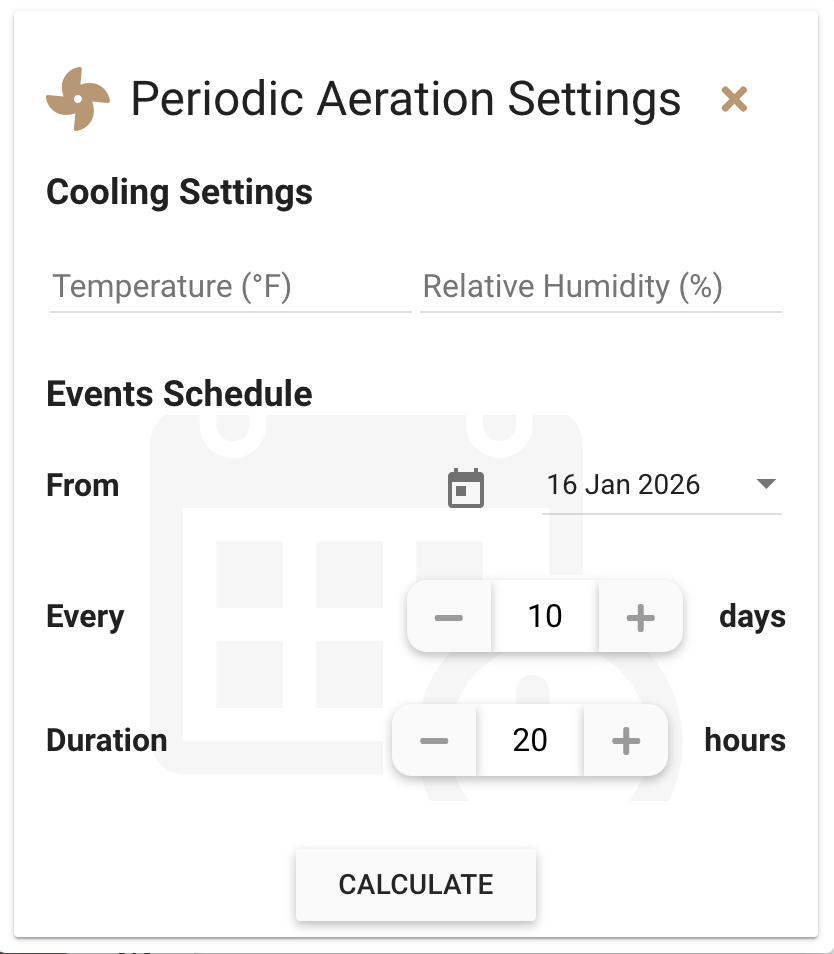
Example Outcome: In one scenario, periodic cooling effectively resolves the germination capacity loss warning and shows that the safe storage time can be significantly extended.
Adjusting or Resetting Scenarios
To run a different “what if” scenario or return to the default (aeration-free) predictions, you can either modify or remove the aeration event and then click the Re-run Simulation button.
Why Centaur’s Predictive Analytics Are Essential
Centaur’s predictive analytics help you make informed decisions about your commodity logistics. For example, if the system suggests that a conditioning scenario could improve the product’s condition and extend its safe storage time, you might choose to hold onto the commodity longer or negotiate a better price. Conversely, if predictions indicate potential quality issues, you might decide to sell or consume the stored commodity sooner.
If you have any questions or need further assistance, please contact our support team at support@centaur.ag. We’re here to help!