Is my PH3 sensor a low or high concentration device?
This article explains how to identify Centaur® devices using the information printed on the device sticker, and what to do if the sticker is missing or unreadable.
1. Overview
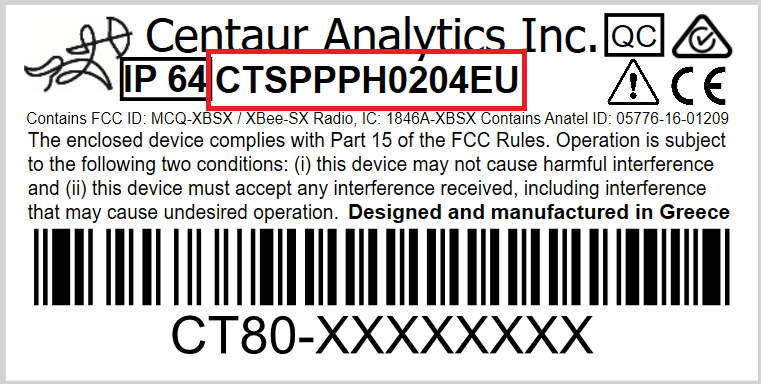
Each Centaur® device includes a factory-applied sticker that provides key identification details required for installation, support, and asset management in the Internet-of-Crops® platform.
2. Information Printed on the Device Sticker
The sticker contains the following elements:
-
Device Serial Number
A unique identifier assigned to the device.
A barcode is included for fast scanning and error-free entry during device onboarding. -
Device SKU (Device Type)
The manufacturer SKU identifying the specific device model or configuration. -
Regulatory and Certification Marks
-
Certifications applicable to the device, such as FCC, CE, or other region-specific compliance marks.
-
Certification details vary by device model; only the marks required for that specific hardware are listed.
-

3. Example: Centaur® Sensor SKUs
Some sensor SKUs indicate specific sensing capabilities. For example:
| SKU / Serial Pattern | Description |
|---|---|
| CTSPPPH0204XX | High-concentration pH3 sensor (as provided by user). |
| CTSPPPH0205XX | Low-concentration pH3 sensor (as provided by user). |
4. If the Sticker Is Damaged or Missing
If the sticker is unreadable, damaged, or missing, and you cannot determine the device type:
-
Record any visible markings or partial serial numbers, if available.
-
Identify the installation location or the Device entry in the Internet-of-Crops® platform, if accessible.
-
Contact Centaur Support for assistance.
Support can help determine the correct device type and serial number.