Activities: Fumigation Protocols
This article explains how to manage activities within the Activities tab, including creating, monitoring, and editing your fumigation and quality plans on the Internet-of-Crops® platform.
1. Viewing Activities
When you open the Activities tab, you’ll see all existing activities you’ve created — whether they are Treatment Plans or Protocols (for pest control)
If you haven’t created an activity yet, you can start one by selecting:
- Create Phosphine Treatment
- Create Heat Treatment
Each activity type includes its own Actions section, which allows you to manage, view, or delete the activity.
2. Actions Available in Treatment Plans
In the Treatment Plans section, you can perform the following actions:
- Quick Overview – Opens a pop-up window with a summary of key details for the selected activity.
- Monitor – Opens a configuration window where you can select the gateway and sensors to monitor your activity. A new process is automatically created for real-time tracking.
- Details – Opens a dedicated page where you can view and edit all information related to this treatment plan.
- Delete – Permanently removes the activity from your list.
Tip: Monitoring connects your selected sensors to the activity, ensuring continuous data collection during treatment.
3. Actions Available in Quality Plans
In the Quality Plans section, you have similar options:
- Monitor – Choose the gateway and sensors to monitor grain quality parameters and create a corresponding process.
- Details – View or update all plan details, such as sample IDs, storage assets, or conditions.
- Delete – Permanently delete the plan from the system.
4. Working with Custom Protocols for Precision Fumigation
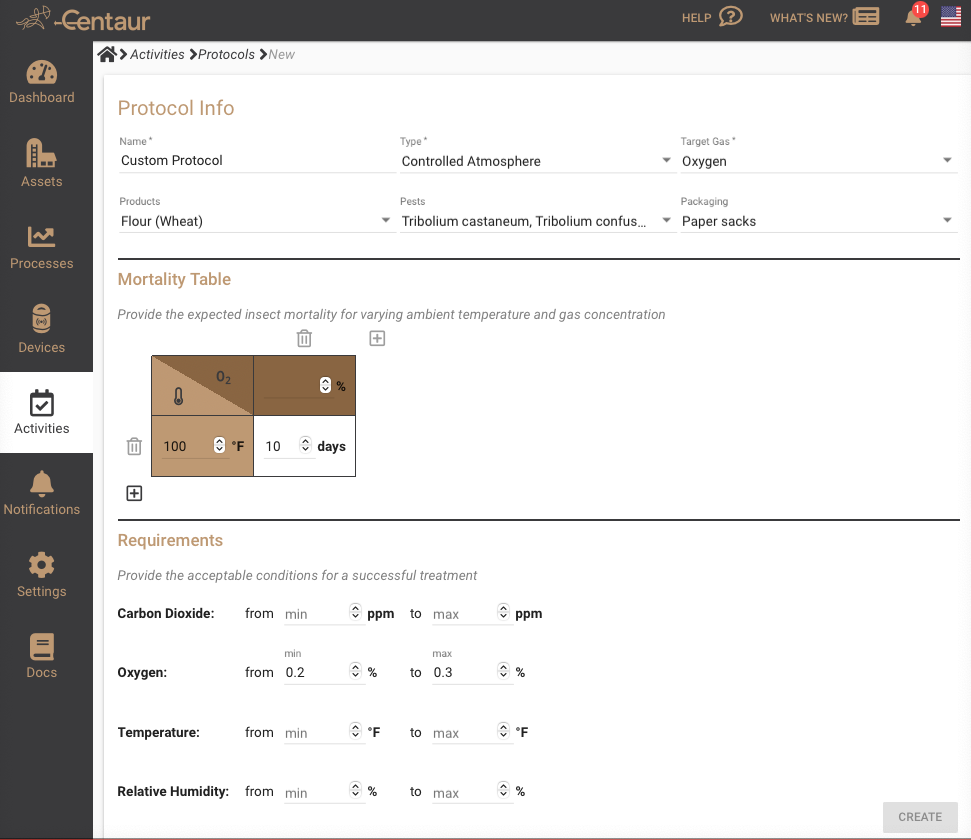
When creating a new Protocol in the Activities module, you define the operational parameters for a pest control treatment. The Protocol Info section allows you to specify the protocol’s name, treatment type, target pests, selected products, packaging, and fumigant gas. A Mortality Table can be configured to record expected insect mortality across different combinations of ambient temperature and gas concentration, allowing you to add or remove entries as needed.
The Requirements section defines the environmental conditions necessary for a successful treatment. Here, you can set acceptable ranges for carbon dioxide, oxygen, temperature, and relative humidity. These parameters help the platform evaluate whether real-time conditions meet the minimum thresholds required for effective pest control.
Once configured, the protocol becomes available for use in Treatment Plans, ensuring consistent, science-based decision-making for every fumigation activity.
Summary
The Activities tab provides a centralized way to manage all your fumigation and quality operations.
By configuring monitoring, reviewing details, and removing outdated plans, you can maintain clear oversight of all ongoing and historical activities within the Centaur Internet-of-Crops® platform.