Solar-Charging Gateway Troubleshooting
If you are experiencing issues with your solar-charging gateway, follow the troubleshooting steps below to identify and resolve the problem.
This article assumes that you have read through “I am losing sensor readings“
Is the Solar-Charger operational?
-
Open the Gateway Casing
-
Locate and open the outer casing of your gateway.
-
-
Inspect the Charger’s Indicator Lights
-
Visually check the charger’s indicator lights.
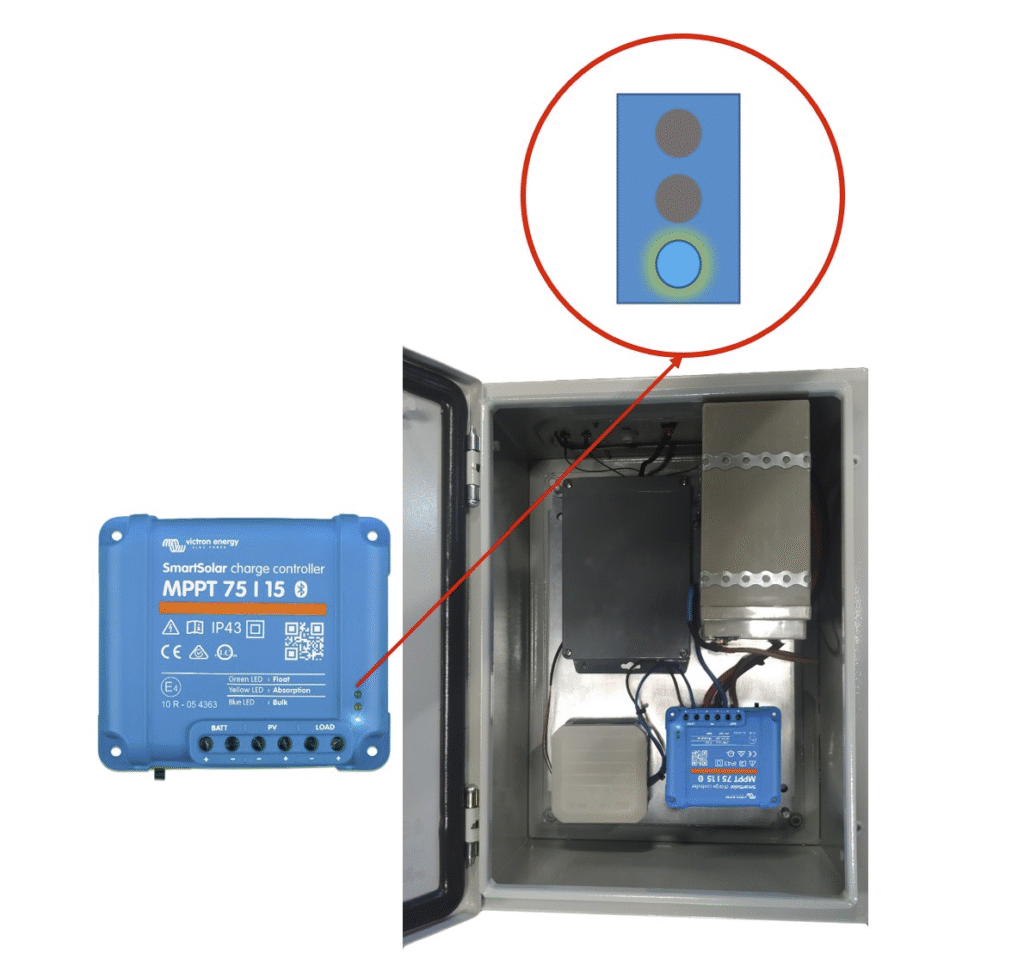
Under normal operation, one of the three colored lights should be solidly lit at a time. Refer to the chart below for guidance:
-
|
Operation mode |
Blue LED |
Yellow Led |
Green Led |
|
Not charging |
Blinking |
off |
off |
|
Bulk charging |
Solidly Lit |
off |
off |
|
Absorption |
off |
Solidly Lit |
off |
|
Float |
off |
off |
Solidly Lit |
Is the Solar-Charger Displaying an Error?
If you’re experiencing issues, the solar-charger may be displaying an error. To troubleshoot:
-
Open the Gateway Casing
-
Locate and open the outer casing of your gateway.
-
-
Check the Charger’s Indicator Lights for Errors
-
Inspect the lights and compare them with the error states listed below.
-
-
-
The following errors are indicated by specific LED patterns:
-
|
Operation mode |
Blue LED |
Yellow Led |
Green Led |
|
The chargers temperature is too high |
off |
off |
Blinking |
|
Charger over-current |
Blinking |
off |
off |
|
Charger or panel over-voltage |
off |
Blinking |
off |
If you’re still encountering issues after following these steps, please reach out to Centaur® Technical Customer Support for further assistance.